
Local demo
Jarvis with a throwaway Alertmanager and 18 realistic Kubernetes alerts, in about five minutes. Nothing here touches your own infrastructure, and the whole thing is removed with a single command.
This is not an installation guide — it installs nothing permanent and configures nothing you would keep. It exists so you can see what Jarvis does before deciding whether to run it for real. When you get to that point, go to Deploy with Compose.
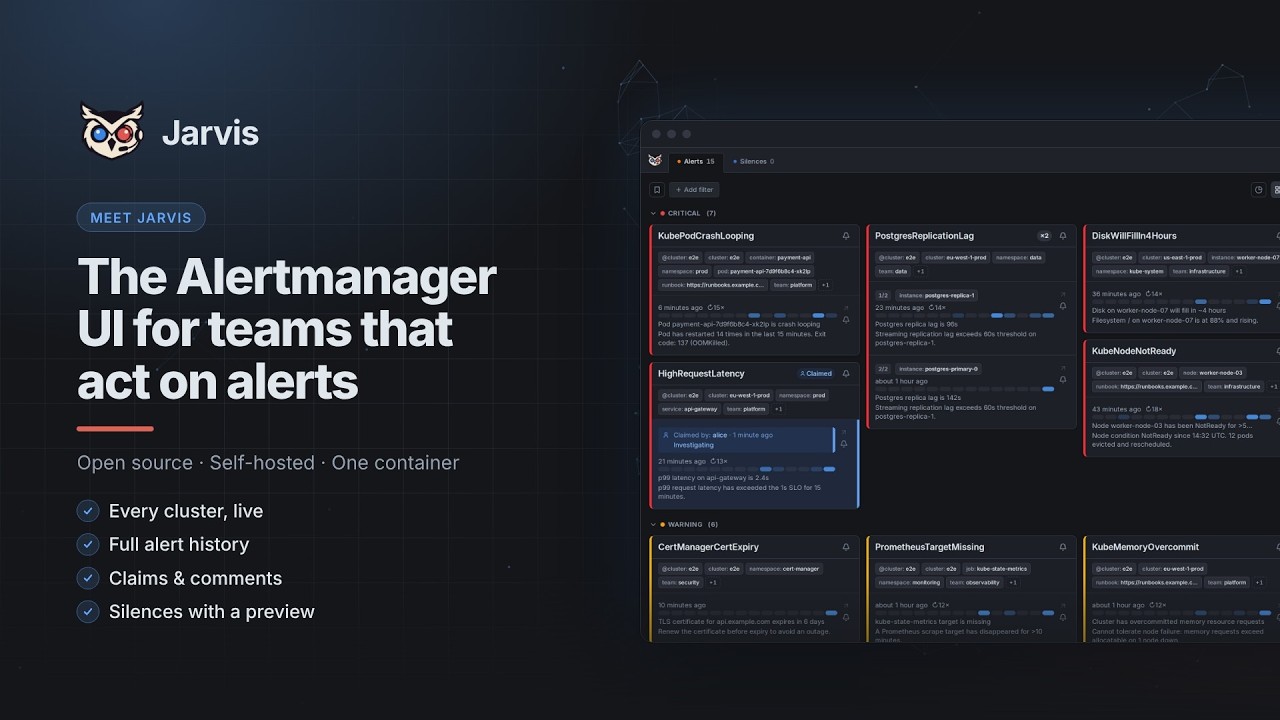
Watch the 2½-minute Jarvis intro on YouTube
What you need
- Podman or Docker with the
composesubcommand - git, make, curl and jq
- Ports 8080 and 9093 free on your machine
The demo runs the published Jarvis image, so nothing is built. The repository is needed for the compose file and the fixture scripts:
git clone https://github.com/kj187/jarvis.git
cd jarvis
Start it
make demo-upThis starts two containers: an Alertmanager with an empty alert set, and Jarvis configured to poll it.
Jarvis is now on http://localhost:8080 and Alertmanager on http://localhost:9093. The alert list is empty — that is correct, nothing has fired yet.
Port 8080 already taken? The development stack uses it too. Run the demo elsewhere with
make demo-up DEMO_PORT=8081 DEMO_AM_PORT=9096, and pass the same variables to the otherdemo-*commands.
Fill it with alerts
make demo-seedThis fires 18 Kubernetes alerts — crash-looping pods, a node gone NotReady, a filling persistent volume, DNS errors — into the demo Alertmanager. They are sent one at a time with random pauses, so it takes roughly two minutes and you can watch the list fill up live in the browser. Jarvis polls every 15 seconds, so each alert shows up within a few seconds of being fired.
Three of the alert names fire as three alerts each (different pods, same alertname, cluster and namespace), which is what makes Alertmanager group them — so the grouping in the UI has something to show.
What to look at
A few things that are hard to notice unless you go looking:
- Card view and list view — the toggle in the toolbar. Card view is built for triage, list view for scanning a lot of alerts.
- Grouping —
KubePodCrashLooping,KubePodOOMKilledandKubeContainerWaitingeach arrive as a group of three. - The detail panel — click any alert. Annotations, labels, the links extracted from runbook, dashboard and generator URLs, and the alert's own history.
For the guided claim, comment, filter, and silence workflow, continue with First steps in the UI. The complete tour is in Features.
Resolve the alerts
make demo-resolveAlertmanager marks all 18 as resolved and drops them from its active list. Watch what Jarvis does with that:
- The alerts leave the active view and appear under Resolved.
- Their history is intact — when they fired, when they resolved, who claimed them, what was commented.
- Nothing was deleted.
That difference is the point of Jarvis. Alertmanager forgets a resolved alert; Jarvis keeps the episode, so you can answer "has this fired before?" a week later. The mechanics are described in Alert lifecycle.
It also means resolving is not cleaning up. Read on.
Clean up
make demo-down    # remove everything — containers and the demo's data volume
make demo-reset   # wipe everything, then start it fresh again
make demo-down is the single command promised at the top of this page: both containers and the demo's data volume are gone, nothing left running, nothing left behind. make demo-reset does the same wipe but immediately starts the stack again with an empty Jarvis — no active alerts, no resolved alerts, no history — so make demo-seed gives you a fresh demo without re-cloning anything.
The demo stack has its own compose project (jarvis-demo) and its own volume, so either command is safe to run without touching the development stack's data.
If you run the fixtures against an instance you actually use, this is what you need to know:
- Resolving removes the alerts from Alertmanager. It does not remove them from Jarvis.
- In Jarvis the alerts stay in the Resolved view, keep their occurrence counts, and stay in the database.
- Retention does not clean this up either — it is off by default (
JARVIS_RETENTION_DAYSunset means no sweep at all), see Data retention. - The only complete removal is deleting the database: drop the
/datavolume, or the SQLite file, and restart.
So the 18 demo incidents—or all 27 when using the extended fixtures below— stay permanently in a production Jarvis history. Use the demo stack for demos.
Beyond the demo
The fixture scripts have a second profile with nine more alerts that exist to stress link extraction, 30-label rendering and escaping. They are useful for development and are what the screenshot suite uses, but they read as a test rig rather than as incidents, so the demo leaves them out:
make fixtures-create      # all 27 alerts, against the dev stack's Alertmanager
make fixtures-remove      # resolve them
make fixtures-partial-resolve  # resolve only three cases: one single alert, one alert in a group, one whole group
make fixtures-refire      # resolve, wait out the grace period, re-fire (~3-4 min)
make fixtures-silence     # create a silence with an escaped-regex matcher
make fixtures-unsilence   # expire it
Those target the development stack (make up plus make up-alertmanager), not the demo stack — see Contributing.
Next steps
- Deploy with Compose — run Jarvis against your own Alertmanager
- Configuration — every environment variable
- Features — the complete feature reference
- Alert lifecycle — why the history can be trusted